
Your Lifeline in the Wild: Why the Garmin inReach Mini 2 is Essential Trail Gear
Think your cell phone is enough for your next backcountry adventure? Think again. From two-way emergency SOS to "breadcrumb" navigation, we’re breaking down why the Garmin inReach Mini 2 is the ultimate insurance policy for hikers and campers. Learn how to master this tiny powerhouse and discover the pros and cons you need to know before you lose signal.
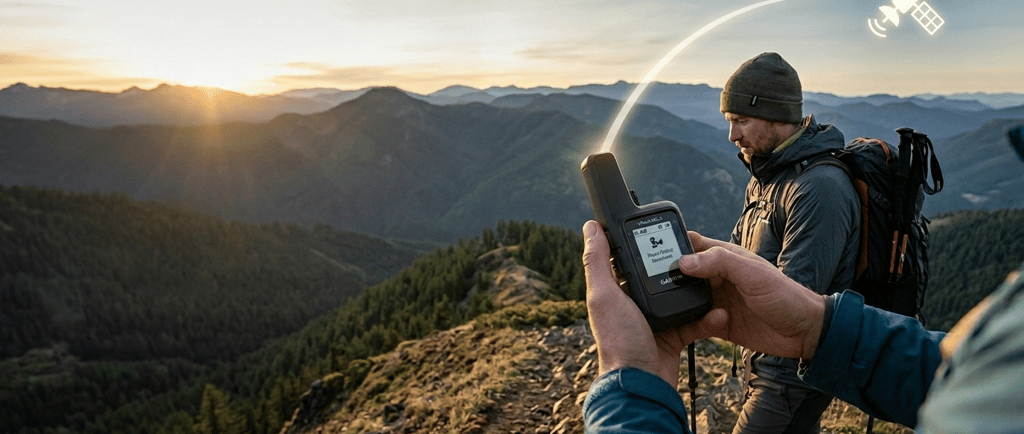
Whether you’re a weekend warrior or a thru-hiker tackling the Triple Crown, the Garmin inReach Mini 2 has become the gold standard for off-grid safety. At only 3.5 oz, it’s roughly the size of a granola bar, but it packs enough tech to be your lifeline when the cell bars disappear.
Here is why this little orange (or black) box deserves a spot on your shoulder strap, and how to actually use it.
Why You Need It: Safety Beyond the Signal
The Mini 2 isn't just a GPS; it’s a two-way satellite communicator. Here’s why it’s a game-changer:
100% Global Coverage: Unlike your phone, which relies on terrestrial towers, the inReach uses the Iridium satellite network. If you can see the sky, you can send a message.
Two-Way SOS: In a true emergency, hitting the SOS button connects you to Garmin Response, a 24/7 professional coordination center. Because it’s two-way, they can text you back to ask about the nature of your injury or provide medical advice while help is en route.
Peace of Mind for Loved Ones: You can send "Check-in" messages (like "I'm starting my hike" or "Everything is okay") to let family know you’re safe without burning through a limited text plan.
Live Tracking: Friends can follow your progress on a web-based MapShare page, seeing your "breadcrumbs" in real-time.
How to Use the inReach Mini 2
Getting started can feel a bit technical, so follow this workflow to ensure you’re trail-ready:
1. Setup & Subscription
Before you leave the house, you must activate a satellite subscription at explore.garmin.com. You can choose between "Contract" plans (cheaper monthly) or "Freedom" plans (month-to-month, perfect for seasonal hikers).
2. Pair with Your Phone
While the device works alone, typing on a tiny screen with two buttons is tedious. Download the Garmin Messenger or Garmin Explore app. This allows you to type messages on your phone’s keyboard while the Mini 2 acts as the "antenna."
3. Basic Navigation & TracBack
If you get turned around, use the TracBack feature. The device automatically records your path; selecting TracBack will show you a "breadcrumb" trail on the screen to lead you exactly back to where you started.
4. Sending a Message
Ensure you have a clear view of the sky (heavy tree cover or deep canyons can delay signals).
Open the Garmin Messenger app on your phone.
Type your message and hit send.
Wait for the "sent" icon on the Mini 2 screen. (Satellite messages can take anywhere from 30 seconds to 20 minutes depending on satellite overhead).
The Reality Check: Possible Cons
No piece of gear is perfect. Here are a few things to keep in mind:
The "Satellite Tax": The device itself is an investment (usually around $400), but the recurring monthly subscription is the real cost. Even if you don't use it, you'll likely pay a small "Enabled" fee to keep the SIM active.
The Learning Curve: The interface on the device itself is a bit "old school" (no touchscreen). You’ll want to practice with it in your backyard before relying on it in the wilderness.
No Dedicated Phone Number: Unlike some competitors (like ZOLEO), the inReach doesn't give you a permanent, dedicated phone number. When you text someone, it may come from a random data string, which can confuse recipients if you haven't warned them beforehand.
Slow Messaging: This isn't iMessage. It’s "space mail." Expect a delay between hitting send and the recipient receiving it.
Is it worth it?
If you frequently hike solo or in areas with zero cell service, yes. The weight-to-safety ratio is unbeatable. It turns a potential tragedy into a manageable "oops" and keeps your family from pacing the floor while you're enjoying the views.
As an Amazon Associate I earn from qualifying purchases.
© 2026. All rights reserved.


Gear Up. Head Out. Hike On.